Cloning creates a copy of a guide that you can use in the same app or a different one. This is useful when you want consistent onboarding, announcements, or walkthroughs across multiple apps without building each one separately.
Cloning is supported between web apps and between mobile apps, but not between web and mobile apps. Cloning is only supported between apps within the same subscription. Some settings behave differently depending on your cloning scenario. This article covers what copies over and what you'll need to update in the cloned guide.
Prerequisites
- Guide creator permissions. If you're copying across apps, you must have guide creator permission on both apps.
Clone a guide
To clone a guide:
- In the left-side menu, go to Guides > Guides.
- Select a guide from the guides list.
- On the guide's details page, select the ellipses (...) in the top-right corner and then select Clone Guide from the dropdown menu.
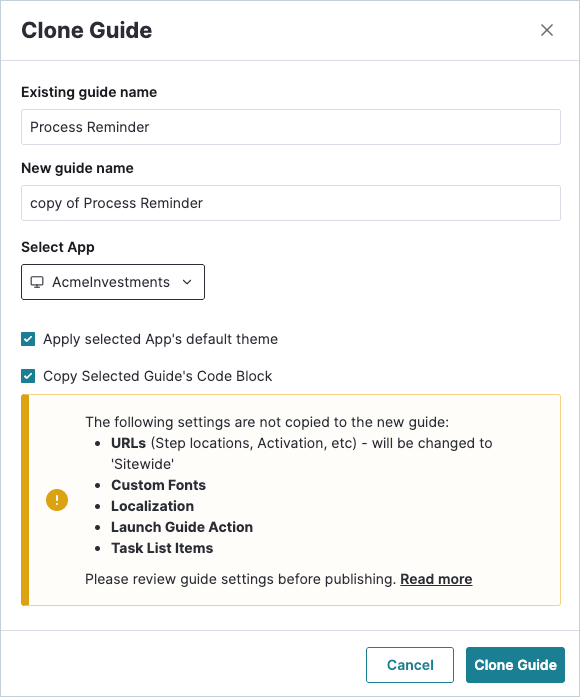
- In the Clone Guide window, enter a name for the new guide. You can also edit the name of the existing guide or keep it the same. Select the app where you want to clone the guide from the dropdown.
Theme behavior when cloning
When cloning a guide, you can choose to keep the original design, or use the default theme for the app that you're copying to.
Note: Custom-edited building blocks will be cloned as is (the same design). This only affects themed elements.
Settings that copy when cloning
When you clone a guide, most of the guide's content and design carry over to the cloned guide. Some settings behave differently depending on whether you're cloning between web apps or between mobile apps. Use the tables below as a quick reference.
Web guides
| Settings | Clone in the same web app | Clone to a different web app |
| Guide content and design | Copied. | Copied. |
| Theme | Copied. | Copied, unless you choose to apply the default theme from the app you're copying to. |
| Code blocks | Copied. | Copied only if you choose to, and the app you're copying to allows code blocks. |
| Step locations and activation | Copied. | Reset to Sitewide, but you can set the Page or Feature where each step should appear. |
| Custom fonts | Resets to the default font. | Resets to the default font. |
| Localization | Copied, unless you choose not to, or if the guide contains a custom code block. | Not copied. |
| Launch guide button action | Copied. | Not copied. Any buttons with a Launch guide action need to be set in the cloned guide. |
Mobile guides
| Settings | Clone in the same mobile app | Clone to a different mobile app |
| Guide content and design | Copied. | Copied. |
| Theme | Copied. | Not copied. |
| Code blocks | Not supported. | Not supported. |
| Step locations and activation | Copied. | Removed, but you can set the Page or Feature where each step should appear. |
| Custom fonts | Copied. | Resets to the default font. |
| Localization | Copied, unless you choose not to. | Not copied. |
| Launch guide button action | Copied. | Not copied. Any buttons with a Launch guide action need to be set in the cloned guide. |
| Poll fonts | Reset to Roboto or SF. | Reset to Roboto or SF. |
Note: Cloning between web and mobile apps isn't supported.