Segment a Poll to exclude users from an account after one account visitor has provided a response?

We have a poll asking our visitors about their organization's software. Once one person from a company has responded, we don't want to continue to pester the rest of their peers. Is it possible to manage this via segments?
1
Comments
Hi Eric Pierce, This is not doable directly as of now but I did achieved this using custom code and metadata.
Here is how you can do it, we can use a custom account level metadata to pass this info to the target segment so that we only show the poll guide once to the whole account/company and if any one user responds to the poll the guide goes away for the entire account/company.
Add a new custom boolean type metadata field in your settings >> data mapping >> Account level Data, give it some relevant name for example "Responded to Poll".
Now let create a new API key for the custom code using Pendo API to work, go to Settings >> Integration >> Integration Keys and then add a new key with write permissions, save it somewhere safe we will need to add it to code.
Now open your poll guide and add a code block and insert the code below in the JS section of the code block,
Once you add this code, it will run on guide load automatically, we can modify this to run on submit button too, do let me know if you want that.
This final step, you would need to add a new rule in your current target segment which would be >> your custom metadata IS NOT EQUAL to True.
You can reach out to me on LinkedIn as well.
Hi Rohit Pandey , this is super interesting! Thanks very much for your input!
Is this specifically running the rule based on whether or not a user at the account as replied to the poll? Or just if they've viewed it. If the latter, (and I'm sort of presuming that based on your not about modifying to run on the submit button), how would you go about switching it to run on the Submission of a poll? (In the instance I'm working on, if a user looks at the poll but doesn't answer it, I'd still like someone else at the company to have an opportunity to, haha)
Additionally, when you say this rule will dictate that the guide will only be shown to visitors/account once, do you mean to say that it will be shown until we receive a response from one of those users within that account, and then it won't be shown anymore to users from that account? Or it will be only shown for once session (per visitor, presumably)? B/c the former is okay, but the latter feels like it'll get missed (if the poll is only shown for one session and if they don't answer/view it, it goes away).
Thanks for your time!
Eric Pierce, here is the updated version of the code, you will have to do inspect element on the submit button and get its id, refer attached image.
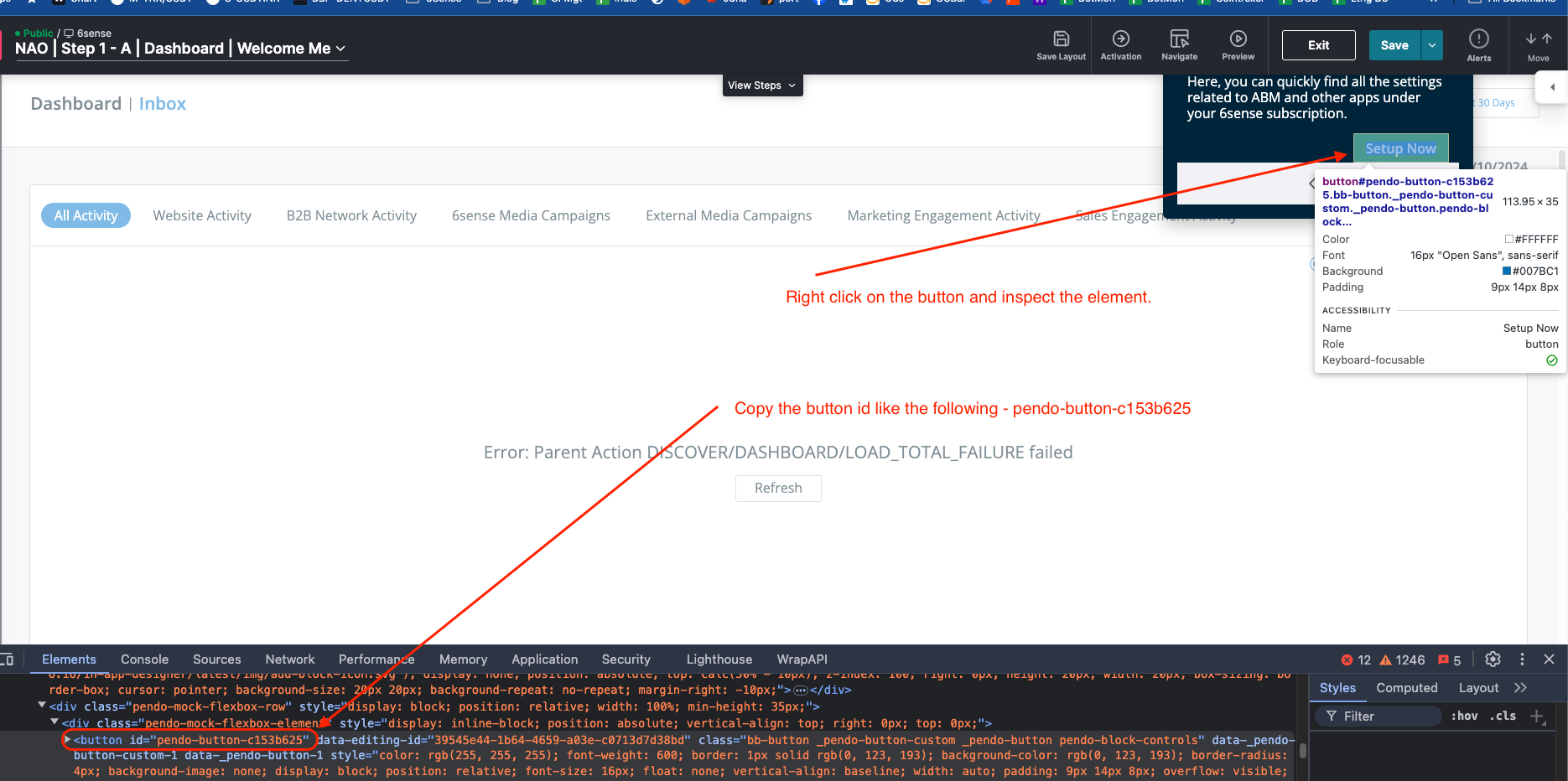
Now this code will allow the guide to be shown to all the users in a account until any one the user clicks on the submit button and thats when the guide will stop appearing to the entire account but not before, so in short you wont miss on any feedback from any of your target accounts.
Additionally you can also make some of the questions mandetory in your poll so that the submit button does not appear untile the qustion is answered. this can be done by just adding {/required} in front of the question in the designer window.
Please sign in to leave a comment.