Pendo Guide Displaying off Date year

Forgive me if this is basic, using pendo on Salesforce for internal users. We manage our opportunities via a close date and if that close date is past due of today, we would like to provide some sort of in app messaging for that user to update that close date or take action. Can pendo display in app guides to user based off a date? I wouldn't mind if it triggered just because of the year containing 2024 "Close Date: 11/19/2024 11:41am"
Thank you!
0
コメント
You should be able to use guide step element targeting to look for that specific input and then toggle on the "element contains rule" option to specify that the guide step should be looking for text/numbers that contain "2024" for example.
If you want the guide step to look and compare a date to the current day (or month), you'd need to add a custom code block to your guide step and use javascript to find and compare the dates, then do an action (such as, if the date you find and compare means the account is in good status, hide the guide; otherwise, show the guide).
Liz Feller do you have any suggestions on how to find the date on the page?
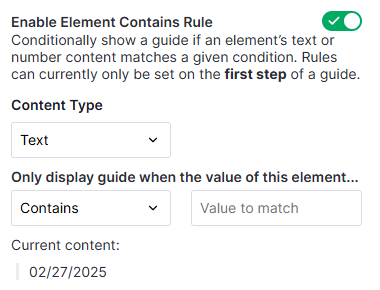
Is there a method for pulling the information from the targeted element in Pendo? I am working on a JavaScript snippet that does a date comparison with the current date, and then advances the guide, however I'm unable to find a method for extracting that date from the Pendo target. I have targeted the element so that if I turn on the "Element contains rule" the correct date is displayed.
From what I've found, this is possible solely in JS/CSS, but the CSS selectors would have to point to an element with a unique class ID. In order to find the target element in Pendo, my CSS selector looks like this:
tr:contains('Excess Liability') .MuiFormControl-root:contains('Select date') input
I'm hoping there's a way to pull this data from Pendo in JavaScript, as my company's application does not use unique class IDs for these elements. Thanks!
if it doesn't have a unique element ID I think you could use a foreach loop in javascript to look at each .MuiFormControl-root:contains('Select date') and evaluate if its date (might be inner text or innerHTML or some attribute like that) meets your condition?
サインインしてコメントを残してください。